Why Batch Processing Matters
If you work with scanned PDFs regularly, you've likely encountered this scenario: a batch of 50 supplier quotes all carry the same "DRAFT" watermark, or a folder of contracts all have the same confidential stamp that needs to be removed before forwarding.
Removing watermarks or objects one file at a time is tedious and time-consuming. PDF Agile's batch processing feature lets you apply the same erasing operation across multiple PDFs simultaneously — saving hours of repetitive work.
What You Can Batch Remove
PDF Agile supports batch operations for all erasing tools:
- Background watermarks — "DRAFT", "CONFIDENTIAL", "SAMPLE", company logos, gray shading
- Object marks — rubber stamps, approval seals, received-date stamps
- Printer marks — crop marks, registration marks, color bars
- Background images — paper textures, gray backgrounds, scan artifacts
Step-by-Step: Batch Remove Watermarks & Objects
Add Multiple PDFs
Open PDF Agile and click Batch Process in the toolbar. Drag and drop all the PDFs you want to process, or click Add Files to select them from your file browser. You can add dozens of files at once — there's no file count limit.
Select the Erasing Tool
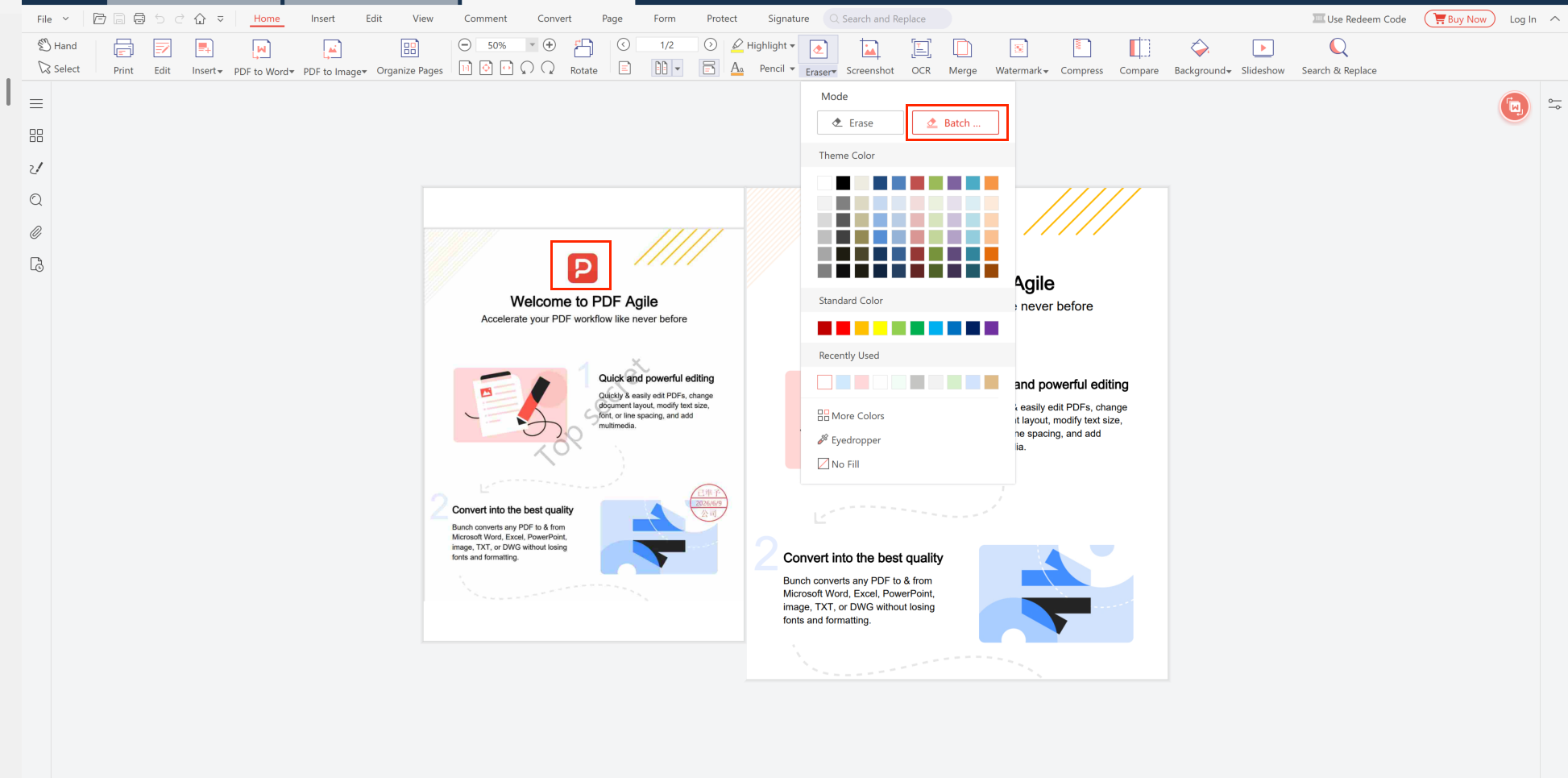
Click the Eraser tool in the Home ribbon, then choose the erasing mode from the dropdown menu:
- Erase — removes specific objects or marks from a selected area on the current page
- Batch... — applies the same erasing operation across multiple pages at once
For watermark removal, you can preview the effect on the first file before applying it to the entire batch.
Configure Erasing Settings
Adjust the erasing parameters based on your needs:
- Watermark detection sensitivity — increase for faint watermarks, decrease to preserve light content
- Erase area selection — for the Magic Eraser, define the region to erase (same region applied to all files)
- Output format — save as PDF or image format
Run Batch Processing
Click Start Batch. PDF Agile processes all files sequentially on your local device. A progress bar shows the current file and overall progress. You can pause or cancel at any time.
Review and Save Results
Once processing is complete, you can preview each file's result. All cleaned files are saved to your designated output folder. The original files remain untouched — PDF Agile always creates new copies.
Common Batch Processing Scenarios
Print Shops & Publishing
A print shop receives 30 PDF files from a client, all with "PROOF" watermarks. Use batch watermark removal to strip all proofs at once, producing clean print-ready files in minutes instead of processing each one individually.
Legal & Compliance
A legal department needs to remove expired "CONFIDENTIAL" stamps from a batch of 40 contracts before re-archiving. Batch Magic Eraser removes the stamp area from all files in a single operation.
Trade & Cross-Border
An importer has 25 supplier PDFs with confidential watermarks that need to be removed before sharing with internal teams. Batch processing cleans all files while keeping them offline and secure.
Education & Training
A university administrator needs to remove "SAMPLE" watermarks from a folder of textbook chapter PDFs before distributing to students. Batch removal processes all chapters at once.
Batch Processing vs. Manual Processing
| Aspect | Batch Processing | One-by-One |
|---|---|---|
| 50 files processed | ~10 minutes | 2+ hours |
| User interaction | Set once, apply all | Repeat per file |
| Consistency | Same settings, all files | Varies by file |
| Error risk | Low — uniform process | High — manual fatigue |
Start Batch Removing Watermarks & Objects Today
Download PDF Agile — free, offline, no registration required.
⬇ Free Download for Windows